
Feely is live: designing a social app for sharing how you feel on the map
My personal venture Feely is live on Android and the web, with the iPhone version on the way. Notes on location privacy, villages, signing in to the web with your phone, 11 languages and app store requirements.
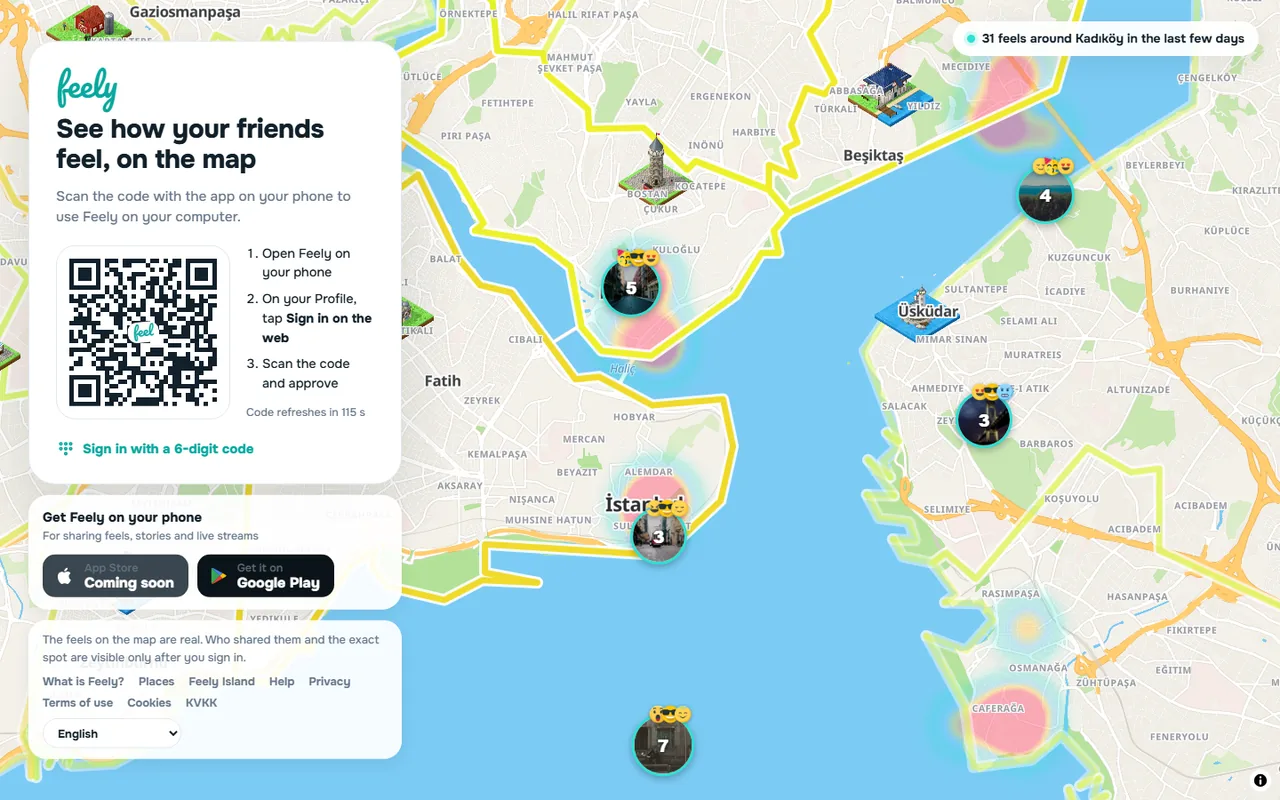
Feely is live. Feely is a social app where you leave how you feel on the map, right where you are, and see where your friends are and how they feel. The Android app is on Google Play and the web version is at feely.world; the iPhone version is coming to the App Store soon. I am Berke Özyaşar, and I built Feely as a personal venture. In this post I use Feely to walk through the main questions that come up when designing a location-based social app.
What's in Feely
- Your feeling on the map: You share what you feel where you are and see your friends' posts on the map.
- Stories and live streams: 24-hour stories, live streams and instant messaging.
- Your village and Representative: Every district has a village; its residents choose its building, its border and its Representative.
- Feely Island: A play area where you walk around with your avatar, play games with friends and decorate your house.
Privacy in an app that shares location
Tying a post to the map means attaching a location to it, and location is one of the most sensitive things a user can share. In Feely I handled this with layered visibility: the posts on the map are real and anyone can see the activity on the map, but who shared them and the exact spot are visible only to signed-in users. A visitor who is not signed in sees an area-level picture, such as "31 feels around Kadıköy in the last few days".
When designing a location-based social app, I think these questions should be answered from the start:
- Will the public view show the person and the exact spot, or only the area and a count?
- When, and with what explanation, will the app ask for location permission? Asking at the moment the user wants to share something, and saying why, is far clearer than asking as soon as the app opens.
- How long does a post stay on the map? Old locations that stay visible forever can reveal a user's movement history.
- How easily can users delete their own posts and their account?
Villages and Representatives: turning the map into a community
A map that only collects dots becomes static after a while. In Feely every district has a village, and the village's residents choose its building, its border and its Representative. The map becomes a place people have a say in together, not just something they look at. In a social product, what brings users back is often not notifications but a community they belong to and a role they can take on there.
Feely Island: a play area inside a social app
Feely Island is a space where you walk around with your avatar, play games with friends and decorate your house. Posts on the map are tied to a feeling and a place in the moment; the island is a way to meet friends in the app and spend time together even when there is nothing to share.
Signing in to the web with your phone
To sign in to Feely on the web, you use the app on your phone: on your Profile in the app, you tap "Sign in on the web", scan the code on your computer screen and approve; you can also sign in with a 6-digit code. The code on the screen refreshes at regular intervals.
This approach has a few advantages: the account lives in the phone app and the web becomes its second screen; users do not have to type a password on the computer; and because the code on the screen expires shortly, someone seeing it or taking a screenshot is not much of a risk. It is a model worth considering when adding a web version to a product that has a mobile app.
11 languages, two writing directions
Feely is available in 11 languages: Turkish, English, Chinese, Hindi, Spanish, Arabic, French, Bengali, Portuguese, Indonesian and Urdu. Arabic and Urdu are written right to left, so in these languages the interface has to be mirrored, icons and directional arrows adjusted, and numbers and mixed text displayed correctly. In a multilingual social app, translation is only part of the job; date and number formats, place names and an interface flexible enough for text whose length varies a lot between languages matter just as much.
On the web there are also public place pages: each place has its own page summarizing the activity there. These pages let someone arriving from a search engine see what Feely is before downloading the app.
Launching a social app on the stores
Publishing an app where users share content and message each other takes more preparation than an ordinary app. The main things Google Play and the App Store expect from this kind of app are:
- Reporting and blocking: Users can report inappropriate content and accounts, and block people they do not want to hear from.
- Community guidelines and moderation: Rules that clearly state what is not allowed, and a process for reviewing reports.
- Child safety: Google Play expects social apps to publish standards against child sexual abuse and exploitation and to provide a point of contact on the subject.
- Account deletion: The account can be deleted from inside the app, with a way to request it that is also reachable on the web.
- Privacy: The privacy policy and the data declarations on the stores match exactly what the app actually collects, location included; for users in Turkey, a KVKK notice as well.
That is why feely.world has separate pages for community guidelines, child safety, account deletion, privacy and KVKK. Planning these pages from the start as part of the product, rather than as the last task before launch, makes store review much easier.
What's next
Next up is the iPhone version: Feely will soon be on the App Store as well. You can find the project details on the Feely page. For your own social app or platform idea, the mobile app development and SaaS product development pages explain how I work.